
This blog post is part of the Azure Spring Clean 2026 virtual community event, promoting well-managed Azure tenants.
The end (of annual SSL/TLS Certificate renewals) is nigh! The maximum validity of SSL/TLS certificates is being significantly reduced over the next few years, so there’s never been a better time to automate your certificate management. In Azure TLS certificates can be used in lots of different places, some of which are easier to manage than others, and for some services you may already have a degree of automation in place. But by 2029 TLS certificates will have a maximum lifetime of 47 days, so automation will be essential to ensure you can continue to keep services running without disruption and significant overhead on the team (or teams) that maintain your infrastructure.
In this blog post we’ll explore some of the different areas of Azure that utilise TLS certificates and how you might consider automating them.
The reduction of the maximum valid lifetime of TLS certificates is being implemented in the following phases:
- Until March 14th 2026: Max 398 days (This is/was effectively 13 months, and has been the standard since September 2020)
- From March 15th 2026: Max 200 days (6 months + 1/2 of a 30-day month + 1 day)
- From March 15th 2027: Max 100 days (3 months + 1/4 of a 30-day month + 1 day)
- From March 15th 2029: Max 47 days (31 days + 1/2 of a 30-day month + 1 day)
This means that by 2029 TLS certificates will need to be renewed nearly 8 times per year (or if you don’t want to leave it until the last minute, more than likely: monthly). What’s also worth noting is that if you renew your TLS certificates before the March 14th 2026 deadline (and get the maximum 398 days), there will be no value in renewing those certificates again until after October 2026, as you’ll otherwise get a certificate with a shorter validity than you already have.
If this isn’t something you’ve thought much about up to now, a good first step would be to document everywhere in your infrastructure that currently uses TLS certificates. Some of the resource types to consider include:
- App Service
- Application Gateway
- Front Door
- AKS Ingress
- API Management
- Virtual Machines (VMs) or ScaleSets (VMSS) running webserver technologies such as IIS, NGINX or Apache Tomcat
- Service Fabric
- CDN
- Traffic Manager
- Container Apps / Instances
- Event Grid
Note: This is not an exhaustive list.
Automating the generation of your certificates will depend on your certificate provider. There is a standard protocol for certificate renewal automation called ACME (Automated Certificate Management Environment) and a number of tools that can be implemented to automate the process with a variety of providers (including Let’s Encrypt, which provides free public TLS certificates). Some certificate providers are offering their own automation platforms, but you could also consider one or more of these tools:
- Posh-ACME: A PowerShell module and ACME client to create publicly trusted SSL/TLS certificates from an ACME capable certificate authority such as Let’s Encrypt.
- win-acme: A Windows-focused ACME client (WACS) that can be scripted to manage certificate renewal, particularly for IIS and Azure-hosted workloads.
- az-acme: A specialized CLI designed to integrate ACME issuers (like Let’s Encrypt) directly with Azure Key Vault, storing certificates and enabling auto-rotation.
- EZCA: A dedicated Azure-native tool for automating certificate renewal across various Azure services, including support for Key Vault auto-rotation.
- Certbot: While general-purpose, Certbot can be used with hook scripts to renew certificates and push them to Azure resources.
These tools not only automate the request and retrieval of a certificate, but can automate the process of domain validation, such as adding a token value as a TXT DNS entry to the domain to prove ownership. They can also automate some of the deployment and configuration scenarios, such as updating the certificate binding in IIS. Most of these tools are free and open source, so well worth consideration before you inadvertently reinvent the wheel.
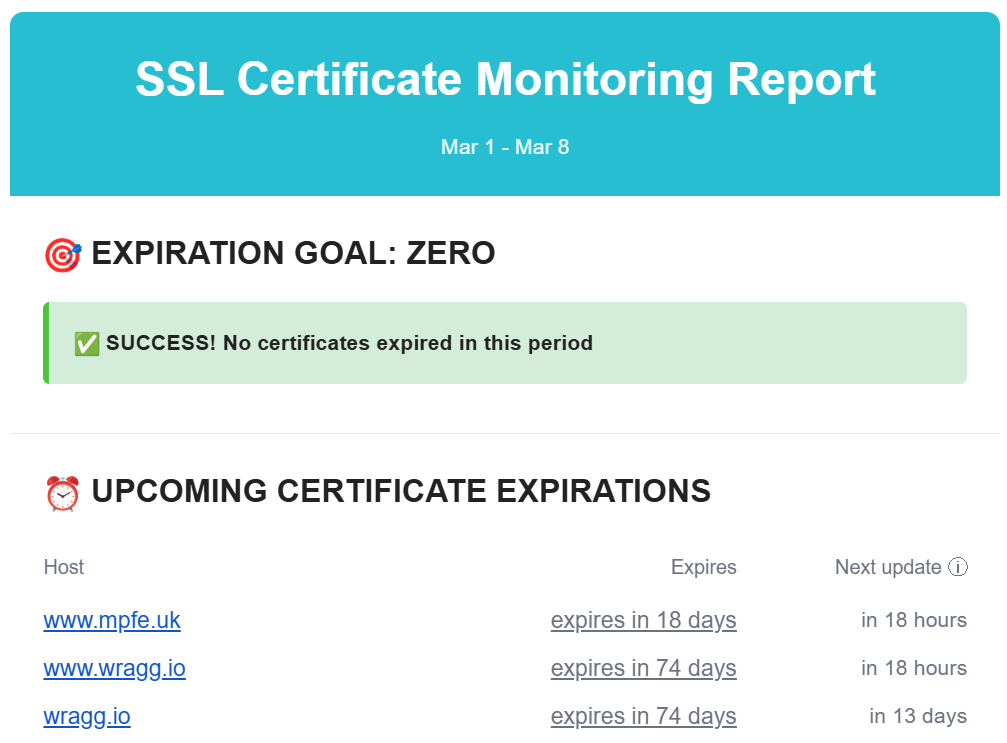
Another tool worth considering is haveibeenexpired.com which you can use to monitor your publicly accessible domains for expiring certificates. When you automate a process, you should also monitor it (trust, but verify).
While the certificate automation tools listed above offer a variety of features, you don’t necessarily need them. For most Azure resources, you just need to hook up to a Key Vault, and then have a scheduled process in place to renew the certificate within that, which can be relatively simple.
Azure Key Vault
Azure Key Vault is the recommended resource to use in Azure for provisioning, managing and deploying TLS certificates. Many other resources in Azure are designed to consume certificates directly from Key Vault, and a single Key Vault can be used to provide certificates to multiple resources.
You can deploy a Key Vault via Bicep as follows:
param location string = resourceGroup().location
param keyVaultName string = 'kv-example'

resource keyVault 'Microsoft.KeyVault/vaults@2023-02-01' = {
  name: keyVaultName
  location: location
  properties: {
    tenantId: subscription().tenantId
    sku: {
      family: 'A'
      name: 'standard'
    }
    enableRbacAuthorization: true
  }
}
There are a few ways to get your certificates in to Key Vault:
- Import a TLS certificate you’ve purchased from an external provider
- Generate a CSR (Certificate Signing Request) via Azure Key Vault which you can then use to complete a certificate request via an external provider
- Use one of the partnered CA providers (Digicert or GlobalSign) to generate and import the certificate directly. This requires having an account with either Digicert or Globalsign and providing your credentials for these within the Key Vault.
When you upload a certificate into Key Vault, it imports various properties including the valid from and valid to dates, which you can then use to monitor the validity of your certificates (such as by configuring alerts in Azure Monitor). When a certificate is generated by Key Vault, you configure an email notification to be sent when a certain percentage of the certificates lifetime has been consumed. You can setup the same for imported certificates, by configuring “Certificate Contacts” on the Key Vault, and going to the Issuance Policy settings of the certificate to configure the percentage you want to be notified at. By default this is 80%.
When you use one of the partnered CA (Certificate Authority) providers, Key Vault refers to this as using an Integrated CA and you can configure automatic renewal. If you’re not using an Integrated CA, then you’ll need to automate the process of retrieving a new certificate, and then upload that into Key Vault.
You can do the latter pretty easily via PowerShell:
# Variables
$kv   = "my-keyvault"
$name = "my-certificate"
$pfx  = "C:\certs\mycert.pfx"
$pw   = ConvertTo-SecureString "PfxPasswordHere" -AsPlainText -Force

# Import certificate
Import-AzKeyVaultCertificate -VaultName $kv -Name $name -FilePath $pfx -Password $pw
Ensure you use the same Name value when renewing the certificate and a new version will be uploaded to the existing entry in the Key Vault.
App Service
Azure App Service allows you to create a free managed TLS certificate (provided by Digicert), which is then fully managed by the App Service and automatically renewed prior to expiry. If you instead provide your own TLS certificate, you can either upload this directly into App Service, or import it from a Key Vault. The latter is recommended, as its then easier (per the above) to monitor and manage your certificate. When you update the certificate entry in Key Vault, App Service automatically syncs the new version within 24 hours and without downtime. You can also trigger a manual sync in App Service.
Note when targetting the certificate in Key Vault you must use the non-version specific URL. Doing so will ensure it always pulls the latest certificate.
If you upload the certificate directly to App Service, you will need to modify the certificate in the App Service config, either via the Portal, or via infrastructure code such as ARM or Bicep. Managing the certificate in Key Vault decouples the management of the certificate from the configuration of the resource.
Here’s an example of how you might configure an App Service to use a Key Vault certificate via Bicep:
param location string = resourceGroup().location
param appName string = 'myapp-${uniqueString(resourceGroup().id)}'
param kvName string = 'kv-example'
param certName string = 'mySslCert'
param customHostname string = 'www.mycustomdomain.com'

resource appServicePlan 'Microsoft.Web/serverfarms@2023-01-01' = {
  name: 'asp-${appName}'
  location: location
  sku: {
    name: 'P1v2'
    tier: 'PremiumV2'
  }
}

resource kv 'Microsoft.KeyVault/vaults@2023-02-01' existing = {
  name: kvName
}

resource webApp 'Microsoft.Web/sites@2023-01-01' = {
  name: appName
  location: location
  identity: {
    type: 'SystemAssigned'
  }
  properties: {
    serverFarmId: appServicePlan.id
    httpsOnly: true
  }
}

resource certificate 'Microsoft.Web/certificates@2023-01-01' = {
  name: certName
  location: location
  properties: {
    keyVaultId: kv.id
    keyVaultSecretName: certName
    serverFarmId: appServicePlan.id
  }
}
If you reference the certificate from Key Vault, you need to grant the App Service permission to read the certificate via the Key Vault Secrets User role. The simplest way to grant this is to configure the App Service to have a System Assigned Identity and then grant this Identity this permission on the Key Vault.
Application Gateway
Similar to App Service, you can implement a TLS certificate in Application Gateway by either configuring it directly on the resource, or via a Key Vault secret. As before, I recommend using a Key Vault to decouple management of the certificate from configuration of the resource.
Here’s a partial example of how you might configure an Application Gateway to use a certificate from a Key Vault via Bicep:
param location string = resourceGroup().location
param appGwName string = 'agw-example'
param keyVaultName string = 'kv-example'
param certSecretName string = 'appgw-cert'
param vnetName string = 'agw-vnet'
param subnetName string = 'agw-subnet'

resource keyVault 'Microsoft.KeyVault/vaults@2023-02-01' existing = {
  name: keyVaultName
}

resource appGateway 'Microsoft.Network/applicationGateways@2023-05-01' = {
  name: appGwName
  location: location
  identity: {
    type: 'UserAssigned'
  }

  properties: {
    sku: {
      name: 'Standard_v2'
      tier: 'Standard_v2'
      capacity: 2
    }

    gatewayIPConfigurations: [
      {
        name: 'gwIpConfig'
        properties: {
          subnet: {
            id: resourceId('Microsoft.Network/virtualNetworks/subnets', vnetName, subnetName)
          }
        }
      }
    ]

    frontendIPConfigurations: [
      {
        name: 'frontendIp'
        properties: {
          publicIPAddress: {
            id: resourceId('Microsoft.Network/publicIPAddresses', 'agw-pip')
          }
        }
      }
    ]

    frontendPorts: [
      {
        name: 'httpsPort'
        properties: {
          port: 443
        }
      }
    ]

    sslCertificates: [
      {
        name: 'sslCertFromKV'
        properties: {
          keyVaultSecretId: 'https://${kvName}.vault.azure.net/secrets/${certSecretName}'
        }
      }
    ]

    httpListeners: [
      ..
    ]
  }
}
Front Door
The pattern for Azure Front Door is very similar to App Service and App Gateway when referencing a certificate from a Key Vault. As before, the System Identity of the Front Door will require the Key Vault Secrets User role on the Key Vault.
Here’s a Bicep example for configuring Azure Front Door with a certificate from Key Vault:
param profileName string = 'afd-profile'
param keyVaultName string = 'kv-prod-network'
param certName string = 'site-cert'
param secretName string = 'site-cert-secret'

resource kv 'Microsoft.KeyVault/vaults@2023-02-01' existing = {
  name: keyVaultName
}

resource afdProfile 'Microsoft.Cdn/profiles@2023-05-01' existing = {
  name: profileName
}

resource afdSecret 'Microsoft.Cdn/profiles/secrets@2023-05-01' = {
  name: '${afdProfile.name}/${secretName}'
  properties: {
    parameters: {
      type: 'CustomerCertificate'
      secretSource: {
        id: kv.id
      }
      secretVersion: ''
      secretName: certName
    }
  }
}

resource customDomain 'Microsoft.Cdn/profiles/customDomains@2023-05-01' = {
  name: '${afdProfile.name}/mydomain'
  properties: {
    hostName: 'www.example.com'
    tlsSettings: {
      certificateType: 'CustomerCertificate'
      minimumTlsVersion: 'TLS12'
      secret: {
        id: afdSecret.id
      }
    }
  }
}
AKS Ingress
For Azure Kubernetes Service, you can also reference a certificate from a Key Vault. However there’s slight additional complexity here in that AKS cannot read from the vault directly. Instead you need to install the CSI Driver in Kubernetes, so that it can then read from the Key Vault and implement the certificate as a Kubernetes TLS secret. Once again using the System Assigned Identity of AKS is recommended for granting access to the Key Vault certificate via the Key Vault Secrets User role.
The CSI Driver can be installed via Helm:
helm repo add csi-secrets-store-provider-azure https://azure.github.io/secrets-store-csi-driver-provider-azure/charts
helm install csi csi-secrets-store-provider-azure/csi-secrets-store-provider-azure
And then within the Kubernetes config you define a SecretProviderClass:
apiVersion: secrets-store.csi.x-k8s.io/v1
kind: SecretProviderClass
metadata:
  name: tls-cert-provider
spec:
  provider: azure
  parameters:
    keyvaultName: kv-prod-network
    objects: |
      array:
        - |
          objectName: site-cert
          objectType: secret
    tenantId: <tenant-id>
And sync the secret to Kubernetes:
secretObjects:
- secretName: ingress-tls
  type: kubernetes.io/tls
  data:
  - objectName: site-cert
    key: tls.key
  - objectName: site-cert
    key: tls.crt
Finally you configure the Ingress:
apiVersion: networking.k8s.io/v1
kind: Ingress
metadata:
  name: app-ingress
spec:
  tls:
  - hosts:
    - www.example.com
    secretName: ingress-tls
  rules:
  - host: www.example.com
    http:
      paths:
      - path: /
        pathType: Prefix
        backend:
          service:
            name: webapp
            port:
              number: 80
API Management
API Management is similar to the other services in that you can upload a TLS certificate to it directly, or reference one in an Azure Key Vault. Once again the latter is the recommendation, for the same reasons as previously stated: you separate the maintenance of the TLS certificate from the configuration of the resource. Again the API Management resource needs permission to read the certificate from the Key Vault, which can be implemented by configuring it with a System Assigned Identity and then giving that the KeyVault Secrets Reader role on the Key Vault.
When you update the certificate in the KeyVault API Management should detect the change within 4 hours and then apply it within 20 minutes. As with the other resources, it is important to reference the Key Vault secret for the certificate without a specific version, so that it always retrieves the latest.
param apimName string
param location string = resourceGroup().location
param gatewayHostname string
param keyVaultSecretId string

resource apim 'Microsoft.ApiManagement/service@2023-05-01-preview' existing = {
  name: apimName
}

resource apimCustomDomain 'Microsoft.ApiManagement/service@2023-05-01-preview' = {
  name: apim.name
  location: location

  properties: {
    hostnameConfigurations: [
      {
        type: 'Proxy'
        hostName: gatewayHostname

        keyVaultId: keyVaultSecretId

        defaultSslBinding: false
        negotiateClientCertificate: false
      }
    ]
  }
}
Virtual Machines or ScaleSets
You can often avoid having TLS certificates on VMs at all, by terminating TLS earlier in the network such as at an Application Gateway, Front Door or Load Balancer. However if you have a need to configure a TLS certificate on a Virtual Machine or ScaleSet there are a couple of good options.
One approach is to use the Azure Key Vault VM Extension. This gives you a very similar pattern as with the other resources mentioned earlier. You reference the non-version specific URL of the certificate’s secret. The extension polls at a specified interval for changes to this secret, and when a new version is detected it downloads the certificate and installs it into the certificate store location of your choice. Here’s a Bicep example for a Windows VM (a similar configuration can be used for Linux VMs):
resource kvExtension 'Microsoft.Compute/virtualMachines/extensions@2023-09-01' = {
  name: '${vm.name}/KeyVaultForWindows'
  location: resourceGroup().location

  properties: {
    publisher: 'Microsoft.Azure.KeyVault'
    type: 'KeyVaultForWindows'
    typeHandlerVersion: '3.0'
    autoUpgradeMinorVersion: true

    settings: {
      secretsManagementSettings: {
        pollingIntervalInS: '3600'
        requireInitialSync: true
        observedCertificates: [
          {
            url: 'https://my-keyvault.vault.azure.net/secrets/my-cert'
            certificateStoreName: 'My'
            certificateStoreLocation: 'LocalMachine'
          }
        ]
      }
    }
  }

  dependsOn: [
    vm
  ]
}
If you’re using IIS, it can be configured to automatically rebind when a new certificate is detected.
Another approach is to use the certbot tool mentioned earlier. This can be installed via apt:
sudo apt update
sudo apt install certbot python3-certbot-nginx -y
And then called as follows to perform an initial retrieval of the cert:
sudo certbot --nginx -d app.example.com
This:
- Validates domain ownership
- Generates a certificate
- Updates Nginx configuration automatically.
Then you can setup a cron job to perform automatic renewal:
echo "0 0,12 * * * root /opt/certbot/bin/python -c 'import random; import time; time.sleep(random.random() * 3600)' && sudo certbot renew -q" | sudo tee -a /etc/crontab > /dev/null
There are more detailed instructions on the official website for a variety of Operating Systems.
Summary
If you’re reading this in 2026, there’s still a good amount of time to get a handle on your certificate management before the activity becomes a monthly task. When considering how to manage certificates in Azure, I recommend the following:
- Audit your estate and ensure you have a good understanding of everywhere certificates are used.
- Use the fully managed certificate services and automatic renewal where possible.
- Centralise certificate management via Key Vault, and consider minimising the number of Key Vaults used to store certificates, which reduces the number of places certificates need to be updated (if you are not able to use auto-renew). You might consider a KeyVault per environment stage for example (Dev -> Staging -> Production) that is then shared by each of the resources in that stage.
- Implement monitoring of certificates to ensure you catch expiring certificates before they become an outage.




Comments